


Perks at Work
4.8800.00 Reviews
App Specs
- Version
- 2.4.69
- Updated On
- License
- Free
- Downloads
- 100,000+
- Developer
- Next Jump Inc.
- Categories
- Shopping
- Platform
- Android
Screenshots
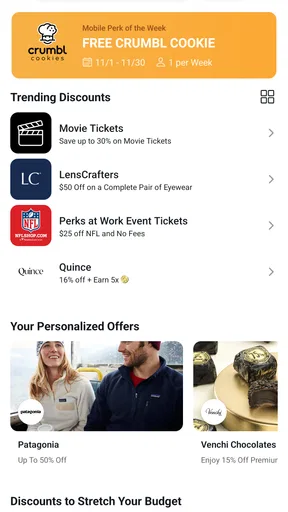
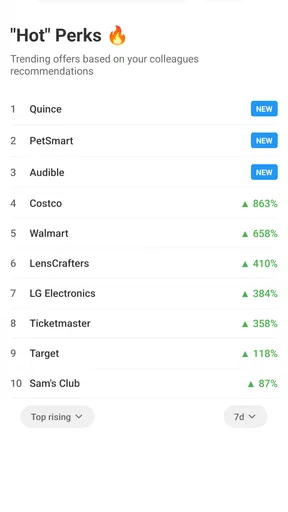
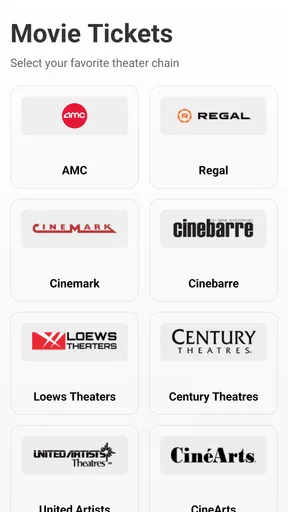
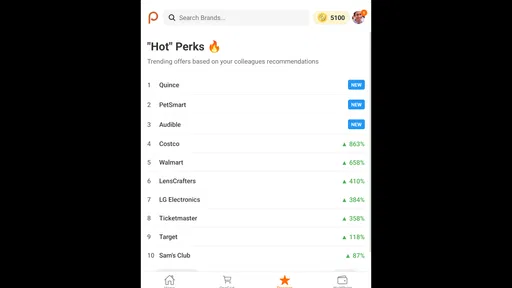
 Analysis by AppCompare
Perks at Work is the kind of shopping app I would open with a specific goal rather than browse casually for hours. Its purpose is to bring employee benefits and discounts into one place, and that makes it most useful when I already know what I need to buy or which type of saving I want to check. The app is free, aimed at Everyone, and comes from Next Jump Inc., so the basic barrier to trying it is low.
My overall impression is that it works best as a practical companion to an employee-benefits program. It is not trying to replace every retailer, marketplace, or coupon service on a phone. Instead, its value depends on whether the offers available through your employment are relevant to your everyday spending. When they are, the app can turn an easily forgotten workplace perk into something I actually remember to use.
How Perks at Work feels in everyday use
The first thing I look for in an app like this is whether it helps me reach a useful offer quickly. Shopping apps often become frustrating when they bury the important information under banners, categories, and promotional distractions. With Perks at Work, I would approach it as a benefits dashboard: open it when planning a purchase, search or browse with a clear purpose, and then decide whether the available discount is worth changing my usual buying route.
That workflow matters because a discount is only valuable if it is easy to understand and practical to redeem. I would not install this expecting a general-purpose shopping feed with every product imaginable. The more realistic expectation is a focused collection of employee-oriented savings. That narrower role can make the experience feel more manageable than jumping between several coupon websites, although it also means the app may not be useful for every purchase.
The app is listed in the Shopping category, but I see it as a bridge between shopping and workplace benefits. It can be especially handy for people who forget the details of their employee program or rarely check benefit portals. Keeping a dedicated app on the phone creates a simple reminder: before paying full price, check whether a relevant workplace offer is available.
Speed expectations and the value of a short route
For this type of app, perceived speed is less about constant animation or complex browsing and more about how quickly I can answer one question: “Is there a useful benefit for this purchase?” A clean path from opening the app to finding a relevant offer makes a bigger difference than a visually elaborate home screen. I would judge the experience by the number of steps needed to move from intention to usable information.
A realistic scenario would be planning a family purchase after work. I might remember that my employer provides access to discounts, open the app before ordering, look for an appropriate category, and compare the result with the retailer’s normal price. That small check can fit into a few minutes. The app is most convincing when it supports this kind of quick decision instead of encouraging aimless scrolling.
Worth Reading Before You Choose

EA SPORTS FC Mobile 26 Is a Bigger Football Game, but It Takes Time

Flipboard Shows What News Apps Must Do Beyond the Feed

Switching to Android Auto Means Rethinking Your Driving Routine

Google Calendar Makes a Crowded Week Easier to Manage

Ludo King Makes the Most of the Minutes Between Plans

Baby Panda World Brings Quick Play to Modern Phones, but Its Game Library Feels Busy
There is also a useful habit I would recommend: check Perks at Work before you begin shopping, not only at the payment screen. Some benefits may influence where I buy or whether I choose one retailer over another. Looking earlier gives me time to compare the offer with familiar alternatives and avoid making a rushed decision simply because a discount appears at the last moment.
At the same time, I would keep expectations sensible. Employee-benefit shopping can involve different offer types and different redemption paths, so the fastest experience will depend on what I am trying to access. If I need an immediate, universally accepted coupon, a conventional coupon app may feel more direct. Perks at Work makes more sense when the employee connection itself is the reason I am opening it.
What happens during heavier shopping sessions
The app’s workload can change considerably depending on how I use it. Checking one benefit is a light task. Comparing several categories, revisiting offers, and switching between the app and a retailer can make the session feel more demanding, even if the app itself remains straightforward. In those moments, organization becomes just as important as raw responsiveness.
I would use a two-stage workflow for heavier sessions. First, I would collect a short list of potentially relevant offers. Then I would verify which one fits my actual purchase, paying attention to the conditions shown in the offer rather than assuming every discount works in the same way. This reduces repeated searching and helps prevent the common mistake of choosing an offer that looks attractive but does not suit the item or timing.
Another non-obvious advantage is that the app can act as a decision filter. Instead of opening several unrelated shopping apps and hoping to find a deal, I can begin with the employee-benefit angle and then move outward only if necessary. That can reduce browsing fatigue. The trade-off is that I may need a backup plan when the available benefit does not match the product, retailer, or purchase I had in mind.
For people who regularly make larger household purchases, I would treat the app as a pre-shopping checkpoint rather than a complete shopping destination. The savings may be more meaningful when I plan ahead, compare the benefit with the ordinary price, and avoid buying something solely because it is presented as discounted. That approach keeps the app useful without letting promotions dictate my spending.
Reliability, recovery, and the moments that matter
Reliability in a benefits app has two sides. The first is technical: the app should open, display information, and let me move through the shopping process without unnecessary interruptions. The second is practical: I need confidence that I have understood how an offer is meant to be used before I commit to a purchase.
I would therefore avoid treating a displayed discount as the final word until I have checked the relevant details in the app and at the retailer. This is not a criticism unique to Perks at Work; employee offers often require more attention than a simple public coupon. The important point is to build a small verification step into the routine. If an offer does not apply as expected, I would return to the app, recheck the conditions, and compare another available option rather than assuming the whole service has failed.
That recovery process is one reason I prefer using the app before payment. If I wait until the final checkout screen, there is less room to investigate an unfamiliar redemption route or change retailers. Opening it earlier gives me a chance to recover from a confusing offer, a poor match, or a decision that no longer looks worthwhile.
The app has a strong public reception, with an average rating of 4.8 from around 2.6 thousand ratings. I take that as encouraging evidence that many users find the service worthwhile, but I would not read it as a guarantee that every workplace, device, or shopping situation will feel identical. Employee-benefit apps are naturally personal: the usefulness of the available offers matters as much as the interface.
Its audience also appears established rather than tiny, with over 100 thousand installs. That gives me more confidence in trying it than I would have with an obscure shopping utility, while still leaving room for individual differences in experience. The developer, Next Jump Inc., is clearly identified, which is useful when I am deciding whether an app belongs in my regular benefits routine.
Device limits and practical expectations
Perks at Work supports Android seven point zero and later, which covers a broad range of devices while still making the operating-system requirement worth checking before installation. If I use an older phone, I would confirm compatibility first rather than assume every shopping app will install smoothly. On a supported device, I would expect ordinary browsing and offer-checking to be more important than demanding graphics or intensive processing.
Because this is a shopping app rather than a game, I would not choose my phone based on high-end hardware. A recent everyday device should be more than adequate for the basic job of opening the app, reviewing benefits, and moving between shopping information. The more meaningful constraints are likely to be practical ones: a small screen can make comparison less comfortable, and switching repeatedly between apps can interrupt the shopping flow.
I also would not keep the app open for long, uninterrupted sessions unless I had a reason to compare many offers. A focused check is a better fit. That keeps resource use modest in normal habits and avoids turning a simple discount search into another background distraction. If I am shopping from a computer, a browser-based benefits portal may be more comfortable for side-by-side comparison; on a phone, the dedicated app is more convenient when I am already away from my desk.
The current version is 2.4.69. For me, the practical lesson is to keep the app reasonably current, especially if I depend on it for regular employee shopping. Updating is not a substitute for checking an offer carefully, but it is a sensible part of maintaining a benefits tool. I would also make sure I can recover my shopping plan if the app needs attention, such as by noting the retailer or offer I intended to investigate before leaving the screen.
Who will benefit most from it
I think Perks at Work is a good match for employees who already have access to workplace discounts but do not have a reliable habit for using them. It can also suit people who make recurring household purchases and are willing to compare an employee benefit with their normal shopping route. The app becomes more valuable when I remember to consult it before buying, rather than downloading it only after seeing an expensive total.
It is less compelling for someone who wants a universal marketplace, the widest possible product selection, or instant public coupons that work independently of an employer. A standard cashback service may be better for a person who shops across many retailers and wants one consistent rewards system. A retailer’s own app may also win when I already know exactly where I want to buy and need inventory, delivery, or loyalty details more than employee benefits.
I would also skip making it my main shopping tool if I dislike comparing conditions or changing established purchasing habits. The app’s employee-benefit focus is a strength, but it can add a layer of decision-making. The best users are comfortable asking whether a saving is genuinely useful, not just whether the headline discount looks attractive.
My performance verdict
After weighing its role, I see Perks at Work as a focused utility rather than a shopping app I would browse for entertainment. Its performance value comes from shortening the path between an employee benefit and a real purchase. When I use it with a clear goal, plan ahead, and verify the offer before paying, it has a sensible place on my phone.
The main friction is that its usefulness depends on relevance. A polished experience cannot compensate for an offer that does not fit my shopping needs, and no employee-benefit app should replace ordinary price comparison. I would pair it with the retailer I normally trust, using Perks at Work as the first checkpoint for possible savings rather than assuming it is always the cheapest route.
The free price and Everyone content rating make it approachable for a wide audience, while its employee-focused design gives it a more specific purpose than general coupon tools. The release date of Mar 31, 2025 also places it among relatively recent app offerings, and the current version suggests an actively maintained product line without changing the need for sensible, offer-by-offer checking.
My recommendation is simple: if your workplace benefits are relevant and you often forget to use them, install it and build a quick pre-purchase check into your routine. If you want a complete shopping marketplace or a universal rewards wallet, choose a broader alternative instead. For the right employee, though, this app can make an overlooked perk feel like a practical part of everyday spending rather than a benefit that exists only on paper.
Pros
- Wide range of employee discounts across shopping
- travel
- and services.
- Exclusive offers can provide meaningful savings on everyday purchases.
- Includes wellness
- entertainment
- and learning-related benefits.
- Search and category filters make relevant deals easier to find.
- Useful for employees whose companies actively support the platform.
Cons
- Access is limited to eligible employees with a participating employer.
- Offer availability and discount values can change without notice.
- Some deals redirect to external websites or require extra registration.
- The number of useful offers depends heavily on your location.
- Certain rewards may include restrictions
- exclusions
- or expiration dates.
FAQs for Perks at Work
What is Perks at Work, and how does it work?
Perks at Work is an employee-benefits platform that gives eligible members access to discounts, cashback opportunities, special offers, travel deals, and other workplace perks. After registering with a qualifying work email or employer invitation, you can browse participating brands and redeem offers through the app or website. Available benefits may vary depending on your employer and location.
Who can use the Perks at Work app?
Perks at Work is generally intended for employees of companies, organizations, or institutions that participate in the program. Some employers may also allow access for family members or former employees, depending on their benefits policy. Registration commonly requires verification through a work email address or an employer-specific access method, so downloading the app does not automatically guarantee eligibility.
Are the discounts and offers on Perks at Work really free to use?
The Perks at Work app is typically free to download and use for eligible members, but the products or services promoted through it are not necessarily free. Each offer has its own conditions, such as minimum spending requirements, expiration dates, exclusions, delivery fees, or limited availability. Before completing a purchase, carefully review the retailer’s terms and the specific promotion details.
What kinds of deals can I find on Perks at Work?
The selection can include discounts on shopping, electronics, clothing, restaurants, travel, entertainment, fitness, gift cards, and everyday services. Some offers provide an instant discount, while others may use cashback, reward points, vouchers, or special booking links. The exact catalog changes regularly and can depend on your employer, country, seasonal promotions, and agreements with participating merchants.
Is Perks at Work safe, and what should I check before signing up?
Perks at Work is designed as an employee-discount service, but you should still use normal precautions when creating an account or making a purchase. Confirm that you are using the official app or website, check the privacy policy, and avoid sharing unnecessary personal or payment information. Also verify merchant reputations, cancellation rules, refund policies, and offer restrictions before placing an order through a third-party provider.


